


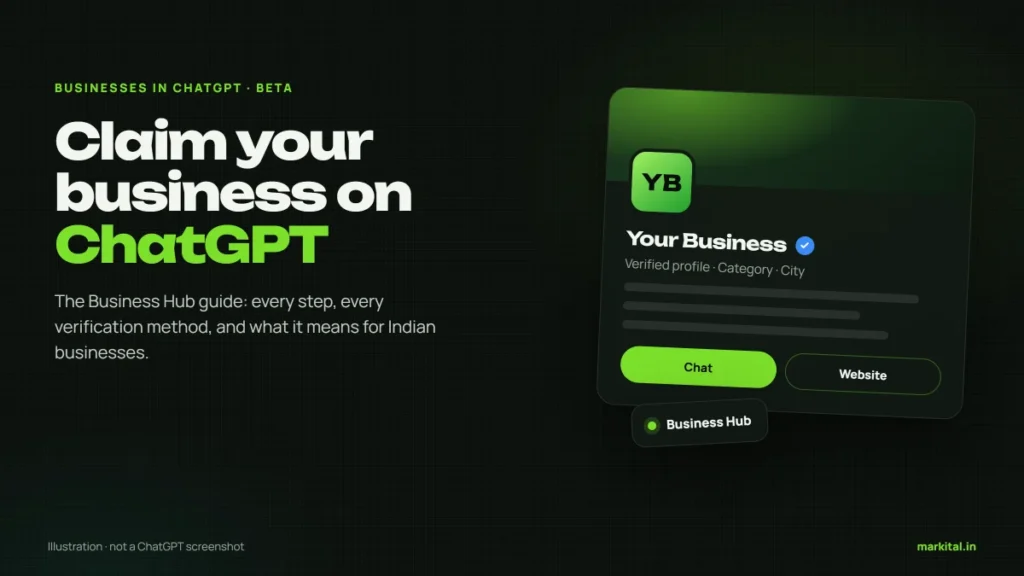
OpenAI now lets businesses claim a profile inside ChatGPT. Here is the full Business Hub process, what it changes, and what Indian businesses can do today.
On 10 November 2026, OpenAI opened something businesses have been asking about since people started using ChatGPT to choose a dentist or a coaching institute: a way to claim your own business inside it. The feature is called Businesses in ChatGPT, it lives in a new section called Business Hub, and it is in beta.
Within a day, half of LinkedIn was calling it “Google My Business for ChatGPT” and a few agencies were already selling “ChatGPT registration” packages. Some of that is fair, and some of it is not. This guide walks through the actual process step by step, using OpenAI’s own help documentation, and is honest about the part most guides skip: what it does for an Indian business right now, and what it does not.
What OpenAI launched, in plain words
Until now, everything ChatGPT said about your business came from somewhere else: your website, your Google Business Profile, directories, reviews, news. You had no direct say. Business Hub gives you one. Once you prove you run the business, you can correct the information ChatGPT holds, add products with current prices, and see roughly how often you come up.
OpenAI’s announcement describes it as “a new way to connect with the 1.2 billion people who use ChatGPT each week.” For eligible US businesses there is a second part, Business Agents: a chat assistant, trained on information you provide, that customers can talk to from your ChatGPT profile.
Sources: OpenAI, “Introducing Businesses in ChatGPT” and the OpenAI Help Center article “Setting up your business on ChatGPT”, both November 2026. Free-at-launch as reported by the Free Press Journal; OpenAI has not published a price list.
If India sounds like an afterthought here, it should not. OpenAI’s India head has said India is now ChatGPT’s largest market by weekly users. We covered what that means for how customers find businesses in our guide to getting recommended by ChatGPT. This post is the practical follow-up.
Can an Indian business claim its profile?
This is the question every Indian business owner should ask first, and the answer depends on what kind of business you run. OpenAI’s help article says eligible businesses can claim or add a listing “where ChatGPT is available and the required verification is supported,” and that “availability depends on the business’s location and type.” ChatGPT is available in India, so the door is not shut. But two lines matter more than that one.
| Your business | Claim a profile? | Business Agent? |
|---|---|---|
| Online store or online service with its own website | Possible now, if verification is supported for you | No, US only for now |
| Local shop, clinic, restaurant, coaching centre | Not yet. Local businesses can currently claim only an existing US listing | No |
| Shopify store | Connect your store to verify | No, US only for now |
| Brand with several branches | Each brand separately; claiming the brand does not claim its locations | No |
Source: OpenAI Help Center, “Setting up your business on ChatGPT”, November 2026.
One hands-on report from an Indian agency, upGrowth, tried it on launch day: the “service” business option showed “Coming soon,” and a physical-location attempt ended on a waitlist. OpenAI says it plans to “expand Businesses in ChatGPT and Business Agents to more markets and business categories” over time. So for most Ranchi businesses the honest status is: not yet, but soon enough that you should get ready now.
How to claim your business on ChatGPT, step by step
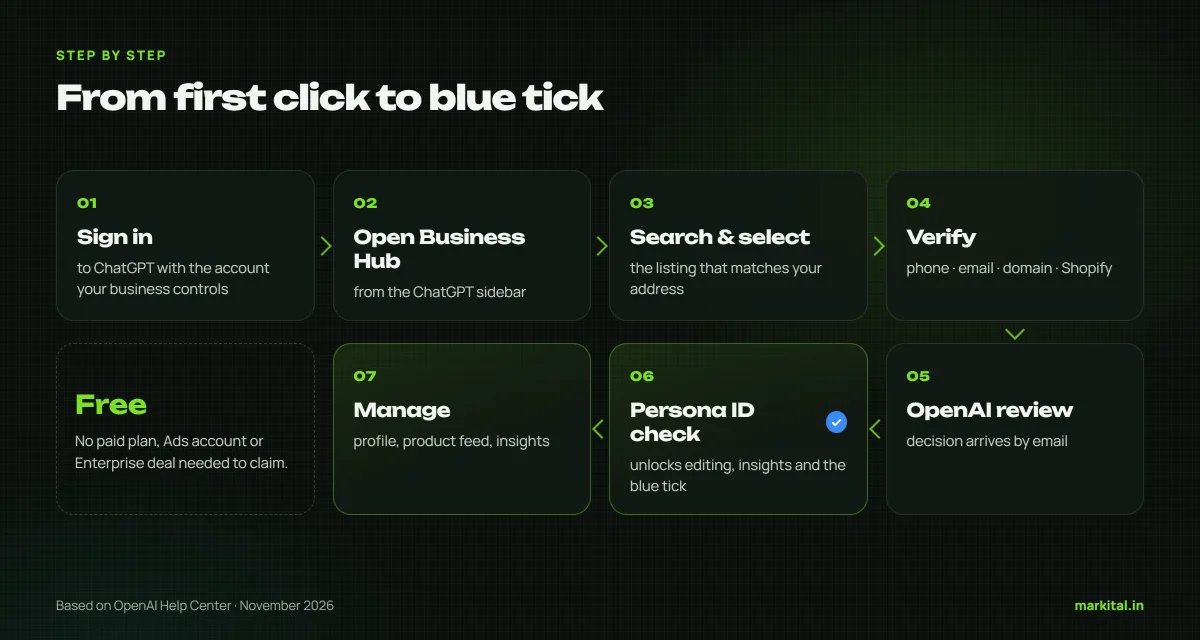
Here is the full process as OpenAI documents it. The button names are the ones you will see on screen. Do this from the ChatGPT account your business controls, not your personal one, because the account that claims the business becomes its admin.
-
Sign in and open Business Hub
Sign in to ChatGPT and open Business Hub from the sidebar. You do not need a paid plan, an Ads account or an Enterprise agreement to claim an eligible business.
-
Search for your business
Type your business name and look carefully at the results. Pick the listing whose address matches yours. If you run an eligible online business and it is not there, you may see an option to add it.
-
Confirm the managing account
Select the listing and confirm which ChatGPT account will manage it. Read the Businesses in ChatGPT terms before you accept them.
-
Verify that it is yours
Choose one of the methods offered: business phone, business email, website domain or Shopify store. The next section explains which to pick.
-
Wait for OpenAI’s review
OpenAI reviews every claim and emails you a decision or a request for more information. No review time is published. You can cancel the claim while it is under review.
-
Complete the Persona identity check
After approval, select Verify with Persona. Until this is approved you cannot publish changes, see insights or build an agent. Approval also gives your profile the blue verified tick.
-
Update your profile and check insights
Fill in your website, description, category, logo, cover photo and policies. Then open Insights to see how often ChatGPT mentions you.
Two situations break the normal flow. If your listing shows Contact support, it is locked and only OpenAI Support can help. If someone else has already claimed it, open the profile, select the ••• menu, then Dispute ownership and prove through Persona that you are authorised to represent the business.
Which verification method should you choose?
OpenAI offers up to four ways to prove the business is yours. Which ones you see depends on your business. All four end in the same place, so pick the one you can complete cleanly today.
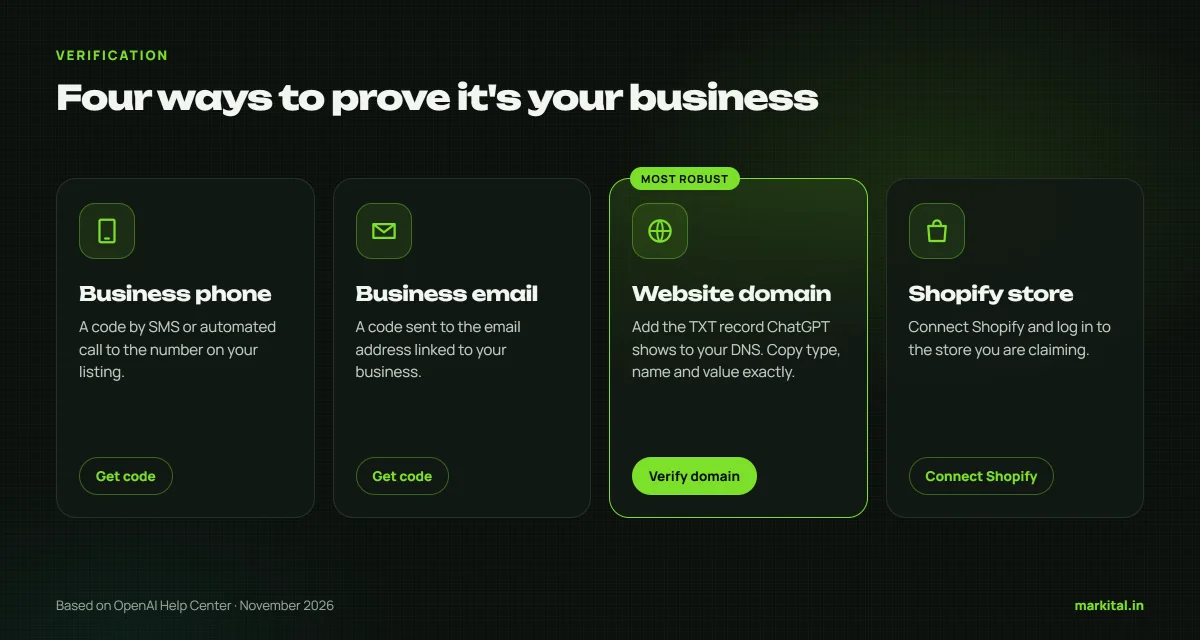
| Method | How it works | Best for |
|---|---|---|
| Business phone | A code by SMS or automated call to the number on the listing | Businesses whose listed number still rings at the counter |
| Business email | A code to the email linked to the business | Anyone with an email on their own domain |
| Website domain | Add a TXT record to your DNS, then select Verify domain | Businesses with their own website. The most robust proof |
| Shopify store | Connect Shopify and log in to the store | Shopify merchants |
For most businesses with a website, the domain method is the strongest, because it proves control of the thing ChatGPT actually cites. Log in to wherever your domain’s DNS is managed, which for many Indian businesses is GoDaddy, Hostinger or BigRock, and add a new TXT record. Copy the type, name and value exactly as ChatGPT shows them. Retyping them by hand is the most common reason this step fails. DNS changes can take a while to appear, so if Verify domain fails at first, wait and try again.
If your developer or agency controls the domain, ask them to add the record. That is a two-minute job for whoever has the login, and a good test of whether you actually own your own website.
The Persona check and the blue tick
Claiming is not the end. OpenAI’s help article is specific: “Claiming your business alone doesn’t give its profile a verified badge.” The blue tick appears only after a separate identity check run by Persona, a verification company.
OpenAI says you may need a government-issued ID, business registration information, and proof that you are authorised to represent the business. It also warns that the business name, address, and any registration or tax number you enter must match your official records. For an Indian business, keep your registration and tax documents next to you and copy from them rather than typing from memory. A mismatch between what you type and what your certificate says is an avoidable rejection.
What to put on your profile
After both approvals, open your profile under Business. This is where the real value is, because these are the facts ChatGPT will hold about you, written by you instead of guessed from a directory listing.
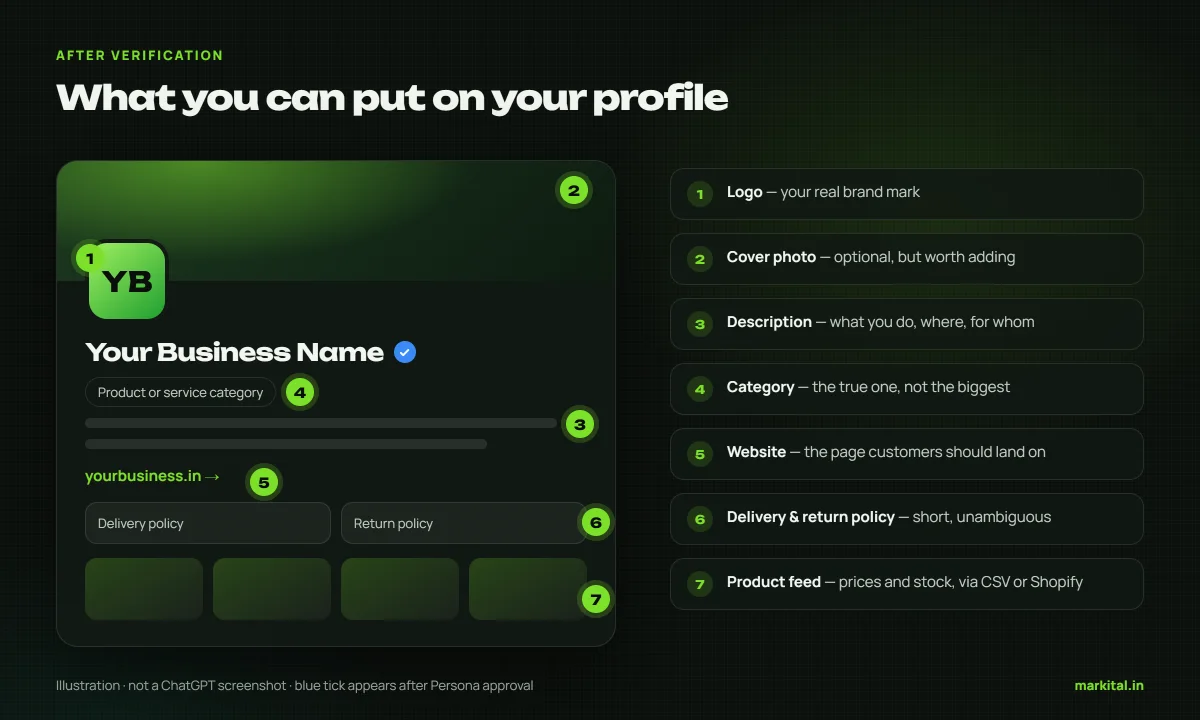
- Website. The exact URL you want customers sent to, ideally a page that answers what you do, where and for whom.
- Business description. Plain, specific, factual. “Orthodontic clinic in Lalpur, Ranchi, offering braces and aligners for teens and adults” beats “leading healthcare provider”.
- Product or service category. Choose the one that is actually true, not the one that sounds bigger.
- Logo and cover photo. Your real brand assets, in a decent resolution.
- Delivery and return policies. Short and unambiguous. These are exactly the questions customers ask an AI before buying.
- Product feed. If you sell products, upload a CSV that follows OpenAI’s product feed specification or connect Shopify, so prices and stock stay current.
Every change goes through OpenAI review before it appears, and ChatGPT may still use other sources when it answers questions about you. So your profile, your website and your Google Business Profile need to say the same thing. If they disagree, you have given the AI a reason to doubt all three.
Insights: how often ChatGPT mentions you
For years, the most common question we heard about AI search was “how do I know if ChatGPT ever mentions me?” Business Hub is the first official answer. Insights cover the past 28 days and show three things.
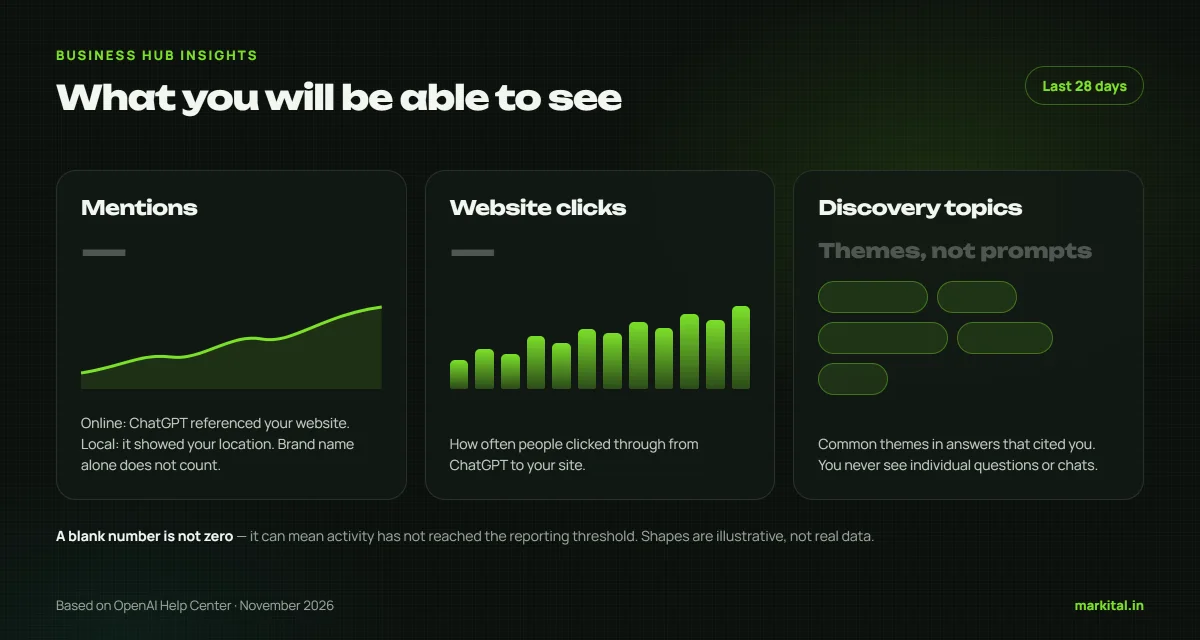
- Mentions. For an online business, a mention counts only when ChatGPT references your website. Your brand name alone does not count. For a local business, a mention counts when ChatGPT shows a result for that location.
- Website clicks. How often people clicked through to your site from ChatGPT.
- Discovery topics. Common themes in the answers that mentioned or cited you. These are grouped categories, not the questions people actually typed.
Two caveats. You will never see individual prompts or conversations; OpenAI does not share them. And a blank number does not mean zero. It can mean activity has not crossed a reporting threshold yet. Small businesses should expect blanks at first.
Business Agents: the part India does not get yet
A Business Agent is an assistant you set up inside ChatGPT that answers customer questions using the information you give it: products, policies, how things work. When your business appears in an answer, a customer can open your profile and choose to chat with it. OpenAI labels that chat clearly and keeps it separate from ChatGPT’s own answers.
Setting one up means reviewing what the agent will know, writing instructions under OpenAI’s Business Agents Policy, previewing it with a real customer question, and selecting Publish. It cannot take payments, make bookings or look up orders; it explains and then links to your website. For now it is limited to eligible ecommerce and online service businesses in the US, so for Indian businesses this is one to watch rather than one to act on.
What claiming will not do
This is where the hype runs ahead of the product. OpenAI’s own help article answers the question directly.
Claiming a profile doesn’t change its visibility in ChatGPT.
That is close to OpenAI’s exact wording. Elsewhere it adds that claiming “doesn’t guarantee increased visibility or give you direct control over ChatGPT’s independent recommendations.” So why bother? Because accuracy, the blue tick and the insights are worth having, and because the businesses that set this up early will learn what ChatGPT says about them while everyone else is still guessing.
What claiming does
- Lets you correct the facts ChatGPT holds about you
- Adds a blue verified tick after the Persona check
- Keeps product prices and stock current through a feed
- Shows 28 days of mentions, clicks and topics
- Opens the door to a Business Agent where eligible
What it does not do
- Push you higher in ChatGPT’s recommendations
- Remove what other websites say about you
- Show you the questions people actually asked
- Replace your website or your Google Business Profile
- Let you delete the profile once it is published
Mistakes that are hard to undo
Because a published profile cannot be deleted, most mistakes here are permanent, or at least slow to fix. These are the ones OpenAI’s documentation and early users point to.
- Claiming from a personal login. The claiming account becomes the admin. Use an account the business controls, then add teammates and your agency from Business Hub, each with their own login.
- Forwarding a claim invitation. OpenAI says not to. Invitations are tied to the email that received them.
- Typing details from memory. Copy your legal name, address and registration numbers from your official documents.
- Creating a second profile. If a listing for you already exists, claim it rather than adding a new one. There is no merge option.
- Choosing a business type that is not true. It might get you past a screen today and cost you the verification tomorrow.
What an Indian business should do this week
If you cannot claim yet, you are not behind. The work that decides how ChatGPT describes you is the same work it will read from your profile later, and it is all available today.
-
Check what ChatGPT says about you now
Ask it, in a fresh chat, for the best businesses like yours in your area, then ask about your business by name. Note what is wrong, missing or out of date.
-
Make your website state the facts
One clear page with your name, what you do, the areas you serve, your address, phone and hours. AI tools cite a business’s own website and listings more than anything else, as our ChatGPT guide explains. Our SEO service starts exactly here.
-
Fix your Google Business Profile
Same name, address and phone as your website, the right category, real photos and recent reviews. It is still the first place most local customers look.
-
Own your domain and email
Make sure you, not a former developer, can log in to your domain’s DNS and use an email on your own domain. Those are two of the four ways to verify a claim.
-
Keep your documents ready
Business registration, tax details and proof that you are authorised to represent the business, all matching each other exactly.
-
Check Business Hub once a month
When local businesses in India become eligible, claim on day one, before a duplicate or a stranger gets there first.
If you would rather have someone check all of this for you, from what ChatGPT says about you today to whether your website and listings agree, talk to us. We will tell you honestly what is worth fixing and what is not.
FAQ
Is it free to claim my business on ChatGPT?
Yes, at launch. OpenAI has not published any fee for claiming a business or using Business Hub. A paid ChatGPT plan is not required, though OpenAI could change pricing later.
Can businesses in India claim their profile on ChatGPT?
Partly. OpenAI says eligible businesses can claim where ChatGPT is available and verification is supported, which in principle includes Indian online businesses. Local stores, clinics and restaurants can currently claim only existing US listings, and Business Agents are US-only.
How long does ChatGPT business verification take?
OpenAI does not publish a review time. It reviews each claim and each Persona submission and emails you a decision or a request for more information. The hands-on part of the process takes well under an hour.
Will claiming my business make ChatGPT recommend it more often?
No. OpenAI says claiming does not guarantee increased visibility or give you control over ChatGPT’s independent recommendations, and that advertising does not influence those answers either. It improves the accuracy of what ChatGPT knows about you.
Can I delete my ChatGPT business profile?
Only while it is an unpublished draft. Once published, a profile cannot be deleted, unpublished or hidden, even by OpenAI Support, so check every detail before you submit.
Do I need Shopify to claim my business on ChatGPT?
No. Shopify is one of four verification methods. You can also verify with your business phone, your business email or your website domain.